
Hyperliquid Flagged Address: What the High-Risk Warning Means
Use this as the main checklist: if Hyperliquid shows the high-risk warning, first identify what is blocked, then check balances, open positions, locks, destination details, and API wallet setup before choosing support, API review, or withdrawal troubleshooting. This guide does not guarantee a withdrawal or recovery outcome.
Exact Warning Message
Users commonly report a message similar to this when the Hyperliquid frontend blocks a wallet:
"Your address has been flagged as high risk by a third-party screening tool. This frontend interface does not support connection to the Hyperliquid blockchain by high risk addresses. If you think this is an error, you can open a support ticket."
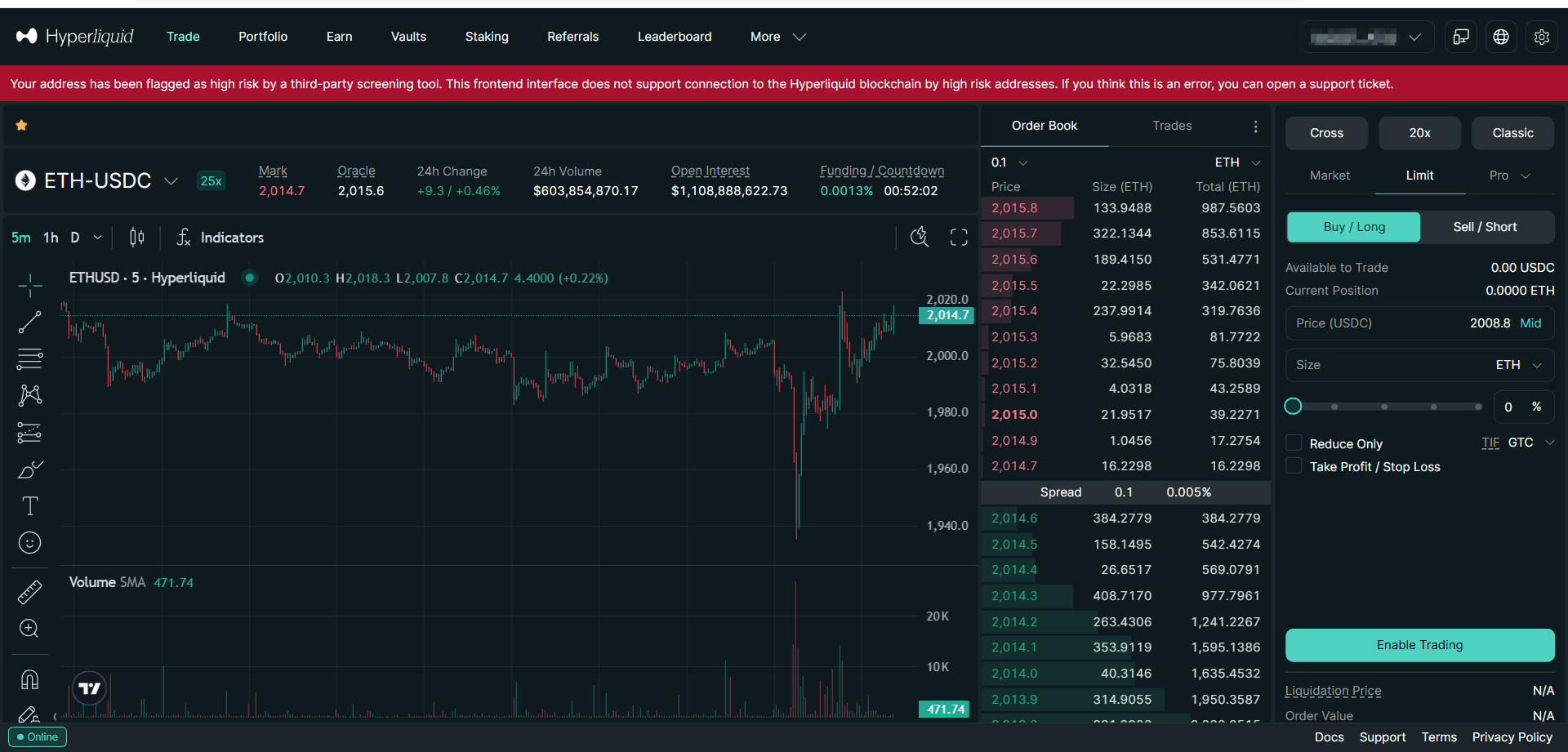
Treat the warning as the start of a short investigation. Save the message, confirm the affected public wallet, then separate frontend access from the actual account state.
This consolidated guide explains the warning text, frontend-state evidence, and safer next steps. If your main question is whether a withdrawal path still exists, start with the Hyperliquid withdrawal options guide.
Start Here: Which Problem Do You Have?
Do not treat every Hyperliquid flagged-address case as the same incident. The right next page depends on what is actually blocked.
| If this is your problem | Start with |
|---|---|
| You only need to understand the exact warning text and why the frontend refuses the wallet. | This consolidated guide |
| You can see value or positions and need to compare support, API review, and withdrawal-path boundaries. | Hyperliquid withdrawal options |
| You are specifically reviewing an API wallet, master account, sub-account, or signing setup. | Hyperliquid API withdrawal guide |
What the Warning Means
The warning has three practical parts:
- Third-party screening signal: an external risk-screening system has associated the address with a risk factor.
- Frontend restriction: the web interface may refuse to connect or submit actions for that address.
- Support path: Hyperliquid points users to a support ticket if they believe the warning is incorrect.
A frontend restriction is not the same thing as confirmed asset loss. It also does not mean every visible balance can move immediately. The useful next step is to check the account state instead of guessing from the warning alone.
Common reasons an address may be flagged
Screening systems may consider direct transactions, indirect exposure, historical counterparties, sanctioned entity links, mixer proximity, exploit-related flows, or false-positive patterns. These systems can also change their scoring over time, so a wallet that worked previously may later face restrictions.
Because the exact screening model is usually not public, do not spend the first hour trying to reverse-engineer the flag. Build a clean account snapshot first.
What to Verify First
Before contacting support or attempting any withdrawal path, create a written snapshot of the account. A simple checklist is enough for most users:
| Item | Why it matters |
|---|---|
| Public wallet address | Identifies the affected account without exposing secrets. |
| Visible balances | Separates confirmed assets from estimated or stale UI values. |
| Open perpetual positions | Market exposure can change the urgency and risk of waiting. |
| Spot, vault, and staking state | Different asset buckets can have different withdrawal rules and lock windows. |
| Recent deposits and withdrawals | Helps support or reviewers understand the timeline. |
| Warning screenshot | Documents the exact message, date, and frontend state. |
Practical note: Keep the review package limited to public addresses, transaction hashes, timestamps, screenshots, and account-state notes with unrelated personal information redacted.
Optional Frontend-State Check
After saving the warning screenshot, you can also document whether the official Hyperliquid frontend currently allows the affected address. This is only a frontend-state check. It does not move funds and it does not replace balance or position review.
Example request: replace the sample value with your own public wallet address.
curl -X POST https://api-ui.hyperliquid.xyz/info \
  -H "Content-Type: application/json" \
  -H "User-Agent: Mozilla/5.0 (Windows NT 10.0; Win64; x64)" \
  -H "Origin: https://app.hyperliquid.xyz" \
  -d "{\"type\":\"legalCheck\",\"user\":\"0xFEFD7B5A477663032A4bc675E2e02CD4286D11b7\"}"
If the response returns {"userAllowed":false}, treat that as a strong signal that the official Hyperliquid frontend currently rejects the address. It helps explain why the web interface blocks connection or actions for that wallet.
Keep the response with a UTC timestamp and the exact public address checked. This evidence belongs in the same folder as the warning screenshot, balance notes, and support-ticket record.
Use this result to explain why the web app is blocking the wallet. Do not use it as the only answer to whether balances, positions, or withdrawal paths exist.
If the account-state review raises a broader asset-recovery question, compare the facts with the smart contract recovery boundary guide and use the block explorer fund-tracking workflow to keep public evidence organized.
Response Options
Most flagged-address situations fall into three response paths. Pick the path after the account snapshot is clear, not while the warning is still the only fact you have.
Option 1: Open a support ticket
Use support when the screening result may be wrong or incomplete. Include the exact warning text, public wallet address, relevant transaction hashes, screenshots, and a concise timeline.
If the account has active market exposure, also write down what can and cannot safely wait while support reviews the ticket.
Option 2: Manual technical review
Use manual technical review when someone can read the account state and explain the next action before anything changes. This route is useful for API wallet issues, open positions, destination checks, and confusing withdrawal errors.
Manual work is not safer just because it is manual. It is safer only when the operator can explain the account, asset, amount, destination, fee, and verification method.
Option 3: Guided workflow review
Use a guided workflow only after the account-state notes are ready and you are comparing practical next steps. It should be evidence-led, not a shortcut around the checklist.
Before using any guided workflow, check who operates it, what permissions it needs, whether read-only diagnostics come first, how fees are explained, and how outputs can be verified.
Hyperliquid API Withdrawal Considerations
When the official frontend is restricted, API review can still matter because the warning is often seen at the browser connection layer. That is why technical users check Hyperliquid API account state instead of relying only on the blocked web interface. For concrete read-only examples, see the Hyperliquid API withdrawal guide.
The important distinction is simple: API access is not the same as a ready withdrawal. The next step still depends on the account state:
- Wallet signing authority is still required for any action that changes account state.
- Open positions may need to be closed or managed before a final withdrawal can be reconciled.
- Vault, staking, or lock-window assets may not be immediately movable.
- Protocol status, rate limits, error responses, and withdrawal fees can affect execution.
- Every transaction should be verified independently by hash, amount, token, destination, and timestamp.
So the practical framing is: the warning may block the official frontend, but you still need to inventory the account before choosing an API path. If you cannot read the documentation, interpret errors, and verify transaction details, do not improvise with scripts while stressed.
What Not to Do After Seeing the Warning
- Do not assume that all assets are lost without checking on-chain and account-state evidence.
- Do not assume that every balance is withdrawable without checking open positions, locks, and fees.
- Do not follow anonymous instructions that claim one path works for every flagged address.
- Do not turn a frontend warning into a rushed transaction you cannot explain.
- Do not hide relevant facts from support or a reviewer, such as recent counterparties or open exposure.
- Do not rush a transaction if you cannot explain what it does and where funds will arrive.
When Not to Use Any Third-Party Workflow
Skip any third-party workflow when the operator cannot explain the process, fees, permissions, destination address, or verification steps. Also skip it if you cannot independently confirm the account state first.
Avoid any workflow that:
- Claims a fixed outcome for every flagged address.
- Uses pressure tactics instead of evidence and written scope.
- Refuses to provide transaction-level verification after execution.
- Cannot explain what happens to spot balances, perps, vault assets, and locked assets separately.
- Cannot provide clear boundaries for cases it cannot resolve.
Practical rule: If the path cannot be described in plain language before execution, it should not be used under incident pressure.
Support Ticket Evidence Checklist
If you open a support ticket, keep it concise and factual. A useful ticket usually includes:
- The affected public wallet address.
- The exact warning text and screenshot.
- The optional legal-check response, including whether
userAllowedreturnedfalse. - UTC timestamp when the warning first appeared.
- Recent deposits, withdrawals, and counterparties that may be relevant.
- Current asset categories: spot, perps, vault, staking, or other balances.
- Whether any open position creates urgent market exposure.
- A short statement if you believe the screening result is a false positive.
Do not overload the first message with unrelated screenshots. Provide enough evidence for triage, then add details if support asks for them.
Related Case Study
For a deeper example of evidence handling, read the anonymized Hyperliquid flagged address case study. It focuses on UTC timeline reconstruction, transaction grouping, fee reconciliation, and public redaction boundaries.
FAQ
Does a Hyperliquid flagged address mean my assets are gone
No. It usually means the frontend has restricted actions for that address. You still need to verify balances, open positions, lock windows, and withdrawal conditions before drawing a conclusion.
Can Hyperliquid support remove the flag
Support is the correct place to raise a possible false positive, but this guide cannot predict support timing or outcome. Provide clear evidence and keep your own account-state notes.
Why can API withdrawal still work when the Hyperliquid frontend blocks a flagged wallet
The warning is commonly seen in the official frontend connection flow. API-based withdrawal or position-management review can still matter, but the exact sequence depends on signing authority, asset type, open positions, lock windows, and current account state.
What should I verify before trying any withdrawal path
Verify the affected wallet, visible balances, asset categories, open positions, lock windows, destination address, fees, and how each resulting transaction will be checked independently.
Should I use a third-party workflow
Only after you understand the scope, permissions, fees, risks, and verification method. Treat it as one possible guided option after evidence collection, not as the only path.
Conclusion
A Hyperliquid high-risk address warning is stressful, but the right response is simple: save the warning, inventory the account, identify what is actually blocked, then choose support, API review, or withdrawal troubleshooting based on the facts.
Need a Technical Review of a Flagged Address
Use the checklist above to organize wallet, balance, position, lock, destination, and API wallet details before choosing the next step.
Request Case Evaluation Read Case Study
ContractRescue reviews public wallet data, transaction history, account-state notes, and execution constraints.
References
- Hyperliquid API Documentation - https://hyperliquid.gitbook.io/hyperliquid-docs/for-developers/api
- Arbitrum Documentation - https://docs.arbitrum.io/
- Industry context: third-party blockchain screening systems can affect frontend access decisions across DeFi platforms.
Disclaimer: This guide is educational and case-dependent. Verify account state, destination details, and transaction records independently before taking action.

About the Author: Carlos Vendrell
Last updated: