
Your Address Has Been Flagged as High Risk by a Third-Party Screening Tool: Hyperliquid Warning Explained
Use this as the warning-text checklist: save the exact message, confirm the affected public wallet, then check balances, open positions, locks, withdrawal history, and API wallet setup before choosing the next path.
If you see the message "your address has been flagged as high risk by a third-party screening tool," do not start by guessing whether funds are gone or trying random withdrawal paths. Start by recording exactly what the frontend says.
This article explains the warning text line by line, then turns it into a practical checklist: what to save, what to check, and when to move from support to technical review or withdrawal-options comparison.
Exact Warning Text
The reported Hyperliquid warning commonly appears in this form:
"Your address has been flagged as high risk by a third-party screening tool. This frontend interface does not support connection to the Hyperliquid blockchain by high risk addresses. If you think this is an error, you can open a support ticket."
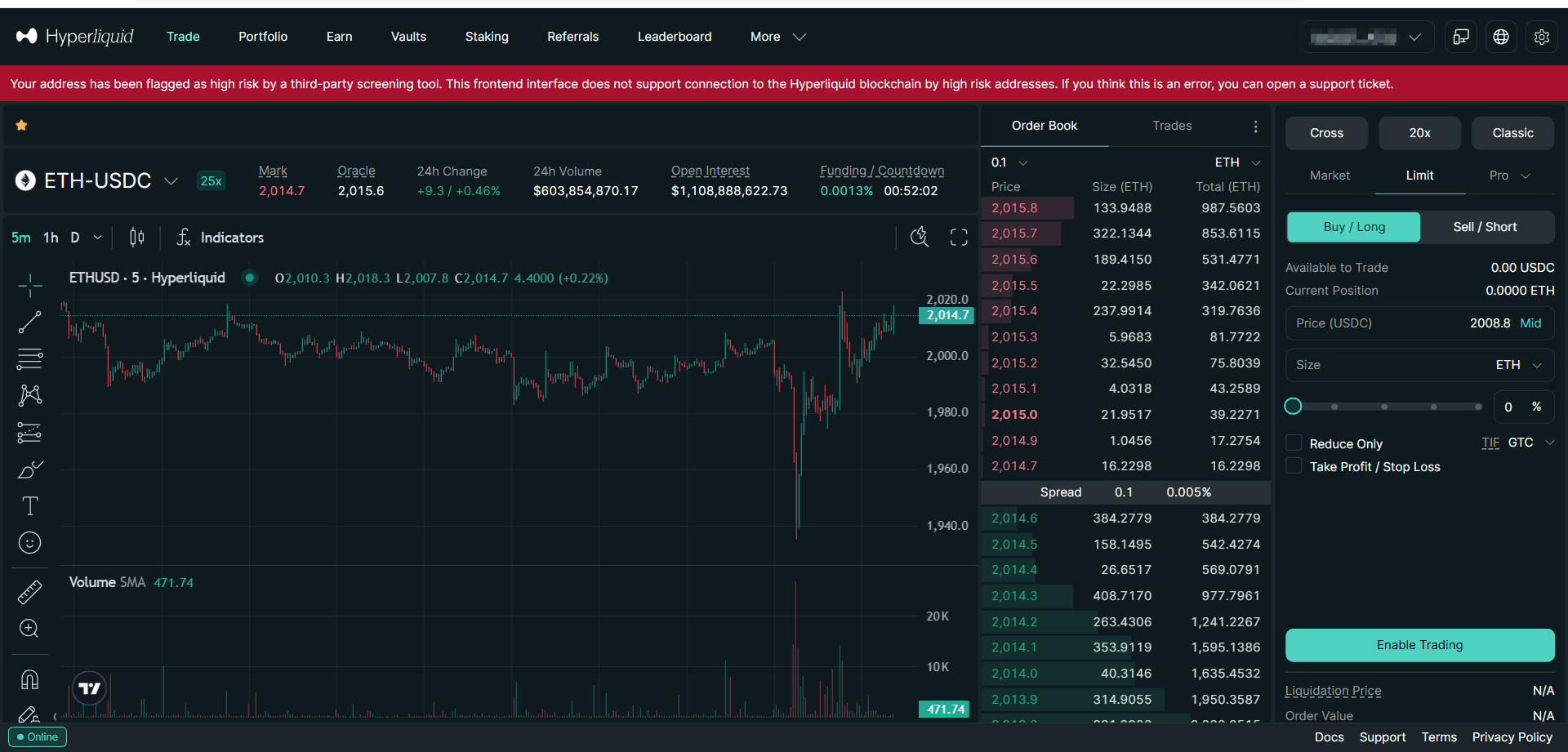
The wording matters because it points to a frontend access restriction. Read it as the start of a checklist: save the warning, identify the affected wallet, then check balances, positions, locks, and withdrawal history separately.
Line-by-Line Explanation
The warning packs three useful clues into one short message. Read each part as a prompt for the next check.
"Third-party screening tool"
This phrase means the address appears to have been evaluated by an external or integrated risk-screening system. These systems may consider sanctions exposure, exploit-linked flows, mixer proximity, indirect counterparties, historical wallet activity, or other risk signals.
The exact model is usually not public, so do not treat this phrase as the whole answer. A factual support record is more useful: public address, timestamp, transaction history, warning screenshot, and current account state.
"Frontend interface"
The frontend is the web application a user opens in the browser. A frontend restriction means the web interface may refuse connection, signing prompts, or normal navigation for the affected wallet. That is different from saying every balance is gone or every account path is closed.
This distinction is important for users who are also reading the broader Hyperliquid flagged address guide. A blocked frontend can be a serious operational problem, but it should be analyzed separately from balances, positions, withdrawals, and lock windows.
"Does not support connection"
This part says the official web interface may not let the flagged wallet connect or continue normal actions. Treat it as a browser-access problem first, then check what assets are visible, whether open positions exist, whether funds are locked, and whether any withdrawal hash already exists.
"Open a support ticket"
The support-ticket sentence is the official escalation path when a user believes the screening state is wrong or incomplete. A useful ticket should be short, factual, and supported by evidence. It should not include secrets or unrelated screenshots.
Optional Frontend-State Check
Some users document the frontend allow-or-deny state by checking the public wallet against Hyperliquid's frontend-state endpoint. This is not a withdrawal instruction. It is just another way to record what the frontend is currently doing.
Practical meaning: a response such as {"userAllowed":false} records that the official frontend currently refuses the public address.
Keep the public address, UTC timestamp, response text, browser warning screenshot, and relevant transaction hashes together. Then continue with balance, position, lock, and withdrawal-history checks.
The phrase legalCheck may appear in technical discussions of this state. Non-technical users do not need to run commands under pressure. It is enough to save the warning screenshot and ask a technical reviewer to document the frontend state if that evidence becomes useful.
What to Verify First
Before deciding what to do, create a clean account snapshot. The goal is simple: support, a developer, or a reviewer should be able to understand the case without asking for private material.
| Evidence | Why it matters |
|---|---|
| Public wallet address | Identifies the affected account without exposing signing material. |
| Warning screenshot | Preserves the exact text and frontend state seen by the user. |
| UTC timestamp | Creates a timeline that can be compared with deposits, trades, and withdrawals. |
| Visible balances | Separates confirmed account values from assumptions or old screenshots. |
| Open positions | Perpetual exposure can create market risk while a support response is pending. |
| Recent transactions | Helps explain whether a screening trigger may relate to deposits, withdrawals, or counterparties. |
Also separate asset categories. A spot balance, open perp position, vault position, staking balance, and locked asset can each have different operational constraints. A response path that is reasonable for a spot-only account may be unsafe for an account with active leveraged exposure.
Ticket boundary: keep the support record limited to public addresses, transaction hashes, screenshots, timestamps, and redacted account-state notes.
What Not to Do
Most avoidable damage comes from rushed decisions after the warning appears. A high-risk address message can feel urgent, but urgency should not replace verification.
- Do not assume the flag is correct without evidence.
- Do not assume the flag is false without evidence.
- Do not enter wallet credentials or device access into an unverified chat, form, website, or script.
- Do not follow anonymous instructions that claim one path works for every flagged address.
- Do not hide recent counterparties, deposits, or trading activity from support or a reviewer.
- Do not attempt manual transactions if you cannot explain the destination, asset, amount, fee, and expected confirmation record.
A careful response keeps options open. A rushed response can create a second incident that is harder to analyze than the original frontend restriction.
Support Ticket Evidence Checklist
If you decide to contact Hyperliquid support, write the first message like an incident report. The best support tickets are concise, chronological, and free of secrets.
Support message template:
Hello, my public wallet address is [public wallet]. On [UTC date and time], the frontend showed: "Your address has been flagged as high risk by a third-party screening tool." I believe this may need review because [short factual reason]. Relevant recent transaction hashes are [tx hash list]. Current account notes: [spot/perps/vault/lock state]. I can provide screenshots of the warning and transaction history if needed.
Keep the ticket factual. Avoid accusations, threats, or broad statements that are not tied to the transaction record. If you believe there is a false positive, explain why with dates, sources of funds, and relevant transaction hashes.
When API-Based Execution May Still Be Relevant
API-based review may matter because a frontend restriction and account-state queries are different layers. That does not mean a user should improvise a script or assume withdrawal is always possible. It means the account may deserve technical review after the facts are written down.
A useful technical review asks narrow questions: which address owns the account, which balances are visible, are there open perps, are there vault or lock-window constraints, what destination address is intended, what fees apply, and how would each transaction be verified?
If you want to compare support, manual review, and a guided workflow option, start with the broader Hyperliquid flagged address guide, the focused Hyperliquid withdrawal options guide, and the Hyperliquid API withdrawal guide, then document the account state before choosing any path.
For cases where the warning is only one part of a larger stuck-asset question, use the smart contract recovery boundary guide to classify what may be recoverable and the block explorer evidence workflow to collect transaction and balance records.
Related Incident Review
For an example of evidence boundaries, read this anonymized Hyperliquid incident review. The case focuses on UTC timeline reconstruction, transaction grouping, accounting separation, and public redaction rules.
FAQ
Does the high-risk warning mean my Hyperliquid assets are gone
No. The warning usually documents a frontend restriction for the public address. You still need to verify balances, positions, lock windows, and transaction history before drawing conclusions.
What does userAllowed false mean
It means the frontend-state check currently indicates the address is not allowed by that frontend path. Use it as one record, then check balances, positions, locks, and withdrawal history separately.
Should I open a support ticket first
If you believe the screening result is wrong or incomplete, support is the official escalation route. Prepare a clear evidence package first so the ticket is easier to review.
Can I withdraw from a flagged Hyperliquid address
Possibly, but it depends on account state, signing authority, asset types, open positions, lock windows, fees, and execution constraints. Do not assume a path is available without technical verification.
What information should never be included in a support ticket
Do not include wallet credentials, exchange logins, device access, or unrelated personal screenshots. A support ticket should use public addresses, transaction hashes, timestamps, and redacted screenshots.
When should I consider a guided workflow option
Only after evidence is collected and you understand the workflow scope, permissions, risks, fees, and verification method. Treat it as one possible option after support and manual review are understood.
Conclusion
The Hyperliquid high-risk address warning is best handled as a checklist. Save the exact warning, verify the account state, prepare a concise support record, and compare options only after you know which assets and constraints are actually involved.
Need to Compare Your Next Step
Use the warning, wallet, balance, position, transaction, and destination notes to compare support, API review, and withdrawal-options paths.
Request Case Evaluation Read Main Guide
ContractRescue reviews public wallet data, transaction history, and redacted account-state notes.
References
- Hyperliquid API Documentation - https://hyperliquid.gitbook.io/hyperliquid-docs/for-developers/api
- Arbitrum Documentation - https://docs.arbitrum.io/
- Related ContractRescue guide - Hyperliquid flagged address guide
Note: This article is educational and case-dependent. Verify account state, transaction records, and destination details before taking action.

About the Author: Carlos Vendrell
Last updated: